Read Tamil, Hindi and English text from photos and scanned PDFs
OCR receipts, forms and scanned pages in eleven Indian languages with Tesseract on India API, choose the right language codes, read the confidence, and get better results from phone photos.
India API runs Tesseract on its own server for Indian scripts: English, Hindi, Tamil, Telugu, Kannada, Malayalam, Bengali, Gujarati, Punjabi, Odia and Marathi. You POST a picture or a PDF and get the text back. Nothing you send is logged or kept.
The OCR endpoint is a model endpoint: from 15 December 2026 it needs a free API key.
Read a receipt
Send the file as the request body and name every script it contains in lang:
curl -X POST "$BASE/ocr?lang=eng+tam" \
  -H "Authorization: Bearer $INDIA_API_KEY" \
  -H "Content-Type: image/png" --data-binary @receipt.png
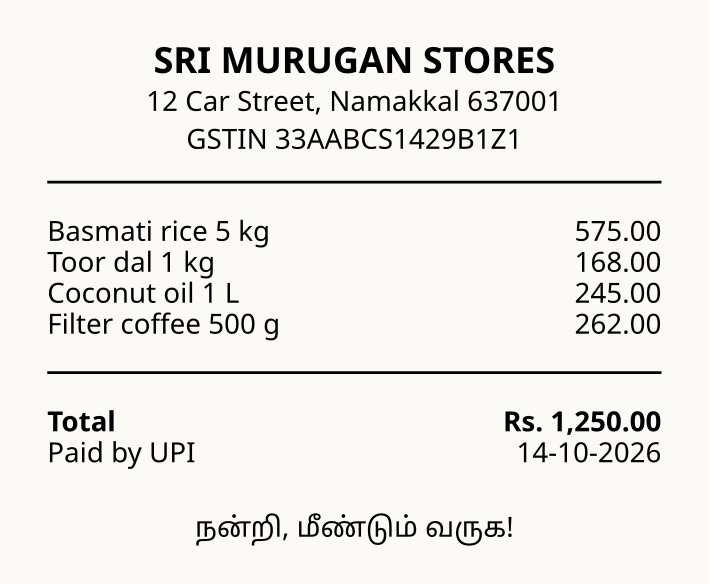
($BASE is https://api.dharun.dev/v1.) For the sample receipt, a printed bill in English with a Tamil thank-you line:
{
  "data": {
    "text": "SRI MURUGAN STORES\n12 Car Street, Namakkal 637001\nGSTIN 33AABCS1429B1Z1\n\nBasmati rice 5 kg 575.00\nToor dal 1 kg 168.00\nCoconut oil 1 L 245.00\nFilter coffee 500 g 262.00\nTotal Rs. 1,250.00\nPaid by UPI 14-10-2026\n\nநன்றி, மீண்டும் வருக!",
    "confidence": 92.8,
    "language": "eng+tam"
  }
}
Choosing lang
| Text on the page | lang |
|---|---|
| English only | eng (the default) |
| Tamil with English words or numbers | eng+tam |
| Hindi | hin, or eng+hin with English |
| Marathi | mar (Devanagari, but its own dictionary) |
| Other | tel, kan, mal, ben, guj, pan, ori; short codes ta, hi work too |
Name every script that appears, at most three. A Tamil page read with eng alone comes back as nonsense Latin letters; that is the commonest mistake.
In Python
import os
import requests

BASE = "https://api.dharun.dev/v1"

def ocr(path, lang="eng", content_type="image/jpeg"):
    with open(path, "rb") as f:
        r = requests.post(f"{BASE}/ocr", params={"lang": lang}, data=f,
                          headers={"Content-Type": content_type,
                                   "Authorization": f"Bearer {os.environ['INDIA_API_KEY']}"},
                          timeout=120)
    if r.status_code == 503:
        raise RuntimeError("the server is busy; retry after " + r.headers.get("Retry-After", "10") + " s")
    r.raise_for_status()
    return r.json()["data"]

page = ocr("form.jpg", lang="eng+hin")
if page["confidence"] < 60:
    print("low confidence: ask for a clearer photo")
print(page["text"])
Scanned PDFs
A PDF is read at 300 dpi, up to 10 pages a request; use first and last for longer files. Each page comes back in pages with its own text and confidence. A PDF that already has a text layer (one you can select text in) is read faster and exactly by /v1/pdf/text: try that first, and OCR only the pages that come back empty.
Better results from phone photos
- Confidence is a signal. It is Tesseract's own average over words, 0 to 100. Above 85 the text is usually clean; below 60, ask for another photo rather than trusting it.
- Flat, bright, straight. Shadows, curved pages and tilt hurt more than low resolution. A photo of about 1,500 pixels across is plenty.
- Crop to the text. Logos and pictures produce stray characters.
- Words with boxes.
words=trueadds each word with its confidence and position, to highlight what to check or to read one field.
For invoices, receipts, cheques and statements, the document endpoints (/v1/doc/...) go further: they find the fields and check them.
The languages and the upload types are on the OCR page.
Then translate what you read
Text read from a Tamil or Hindi page can go straight to /v1/translate. Its languages (a longer list than OCR's) are:
curl "https://api.dharun.dev/v1/translate/languages?utm_medium=guide"
See Translate app content into Indian languages.
The code in this guide is MIT-0: copy it into anything, no credit needed. Updated 2026-11-12.