Docs / Files, documents and media
OCR API
Text from photos, scans and scanned PDFs, in English and ten Indian languages.
Send a picture or a PDF and get its text back, with Tesseract 5. Name the languages the text uses: English, Hindi, Tamil, Telugu, Kannada, Malayalam, Bengali, Gujarati, Punjabi, Odia and Marathi, up to three at once. Files are read and deleted; nothing is kept or logged.
https://api.dharun.devNo key needed for most600 units a minute, 3000 with a free keyThis page as MarkdownRead the text in a picture or PDF
POST/v1/ocr
Returns the text, Tesseract's confidence and, with words=true, every word with its box. A PDF is read up to 10 pages at a time at 300 dpi; a PDF that already holds text is read faster by /v1/pdf/text. Options go in the query string, or as form fields when the file is sent as multipart/form-data.
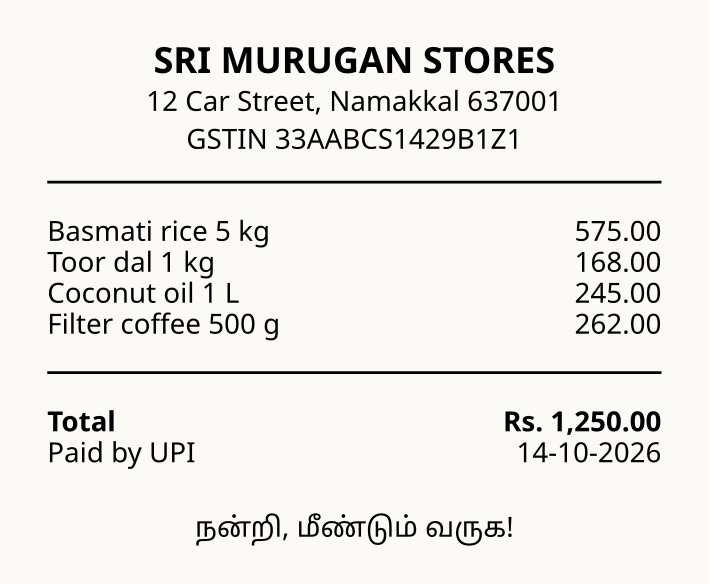
Send: A picture: JPEG, PNG, WebP, HEIC, AVIF, GIF, BMP or TIFF, up to 10 MB. Or a PDF. Post the file as the request body, or as multipart/form-data. Try it with this sample.
Model endpoint: it will need a free API key, sent as Authorization: Bearer <key> or X-API-Key. Until the date on API keys it answers without one and says so in the X-Key-Notice header. With a key: 500 model requests a day.
What you send here is never written to the log, and the answer is not cached.
| Parameter | Description |
|---|---|
langquery | Languages, joined by + or a comma: eng, hin, tam, tel, kan, mal, ben, guj, pan, ori, mar (or en, ta, hi...). Default eng. |
wordsquery | Also return each word with its confidence and box. One of: true, false. |
firstquery | PDF: first page to read. Default 1. |
lastquery | PDF: last page to read; at most 10 pages per request. |
curl
# a sample to try: https://api.dharun.dev/samples/receipt.png
curl -F "[email protected]" "https://api.dharun.dev/v1/ocr?lang=eng+tam&utm_medium=docs"
JavaScript
// input is an <input type="file"> element
const form = new FormData();
form.append("file", input.files[0]);
const response = await fetch("https://api.dharun.dev/v1/ocr?lang=eng+tam&utm_medium=docs", { method: "POST", body: form });
const body = await response.json();
if (!response.ok) throw new Error(body.error.message);
console.log(body.data);
Python
import requests

files = [("file", open("receipt.png", "rb"))]
response = requests.post("https://api.dharun.dev/v1/ocr?lang=eng+tam&utm_medium=docs", files=files, timeout=90)
body = response.json()
if not response.ok:
    raise RuntimeError(body["error"]["message"])
print(body["data"])
Try it here
Change the values and send the request from your browser. Needs JavaScript.
Response, with lists and long text shortened
{
  "data": {
    "text": "SRI MURUGAN STORES\n12 Car Street, Namakkal 637001\nGSTIN 33AABCS1429B1Z1\n\nBasmati rice 5 kg 575.00\nToor dal 1 kg 168.00\nCoconut oil 1 L 245.00\nFilter coffee 500 …",
    "confidence": 92.8,
    "language": "eng+tam",
    "pages": [
      {
        "page": 1,
        "text": "SRI MURUGAN STORES\n12 Car Street, Namakkal 637001\nGSTIN 33AABCS1429B1Z1\n\nBasmati rice 5 kg 575.00\nToor dal 1 kg 168.00\nCoconut oil 1 L 245.00\nFilter coffee 500 …",
        "confidence": 92.8,
        "width": 709,
        "height": 584
      }
    ]
  },
  "meta": {
    "note": "confidence is Tesseract's own, 0 to 100, averaged over words. Name every script the text uses in lang."
  }
}
Guides
Read Tamil, Hindi and English text from photos and scanned PDFs
Using an AI assistant? Connect the MCP server and it can call this API by itself. Want every endpoint on one bench? Open the playground.