Docs / Money and business
QR codes and barcodes API
QR codes, UPI payment QR codes and barcodes as SVG or PNG, and reading them from a photo.
Generates codes, and reads them from pictures. What you encode or send is never logged or kept, and the answers are not cached by shared caches.
https://api.dharun.devNo key needed for most600 units a minute, 3000 with a free keyThis page as MarkdownQR code for any text
GET/v1/qrPOST
Returns the image itself. Text up to about 2,900 bytes at error correction L.
Also takes POST: The text to encode. Send it as text/plain, or as JSON {"text": "..."} with the other options beside it, up to 256 KB.
The answer returns the image itself; errors are JSON as everywhere else.
What you send here is never written to the log, and the answer is not cached.
| Parameter | Description |
|---|---|
textquery | Text to encode (or POST it). |
eccquery | Error correction: how much damage the code survives. Default M. One of: L, M, Q, H. |
formatquery | Image format. Default svg. One of: svg, png. |
sizequery | 2D codes: width in pixels to stay within, 32 to 2048. Default 256. |
marginquery | Light border (quiet zone), in modules, 0 to 16. Default 4. |
fgquery | Dark colour, hex such as 000000. Default black. |
bgquery | Light colour, hex, or transparent. Default white. |
curl
curl -o picture.png "https://api.dharun.dev/v1/qr?text=https://api.dharun.dev&format=png&size=256&utm_medium=docs"HTML
<img src="https://api.dharun.dev/v1/qr?text=https://api.dharun.dev&format=png&size=256&utm_medium=docs" alt="QR code for any text">Try it here
Change the values and send the request from your browser. Needs JavaScript.
Result
UPI payment QR code
GET/v1/upi-qr
A QR code any UPI app can scan to pay, built to NPCI's upi://pay link format. format=json returns the link instead of the image. Nothing is checked with a bank.
The answer returns the image itself; errors are JSON as everywhere else.
What you send here is never written to the log, and the answer is not cached.
| Parameter | Description |
|---|---|
paquery, required | Payee UPI ID, such as shop@okaxis. |
pnquery | Payee name shown in the app. |
amquery | Amount in rupees, up to two decimals. Leave out to let the payer type it. |
tnquery | Note shown with the payment, up to 80 characters. |
trquery | Your reference for the transaction. |
mcquery | Merchant category code, four digits. |
formatquery | Image format. Default svg. One of: svg, png. |
sizequery | 2D codes: width in pixels to stay within, 32 to 2048. Default 256. |
marginquery | Light border (quiet zone), in modules, 0 to 16. Default 4. |
fgquery | Dark colour, hex such as 000000. Default black. |
bgquery | Light colour, hex, or transparent. Default white. |
curl
curl -o picture.svg "https://api.dharun.dev/v1/upi-qr?pa=shop@okaxis&pn=Sri%20Murugan%20Stores&am=250&tn=Order%2042&utm_medium=docs"HTML
<img src="https://api.dharun.dev/v1/upi-qr?pa=shop@okaxis&pn=Sri%20Murugan%20Stores&am=250&tn=Order%2042&utm_medium=docs" alt="UPI payment QR code">Try it here
Change the values and send the request from your browser. Needs JavaScript.
Result
Barcode
GET/v1/barcode/{type}POST
Linear barcodes (code128, code39, code93, ean13, ean8, itf, codabar) and 2D codes (datamatrix, pdf417, aztec). Linear codes are sized with scale and height, 2D codes with size. No human-readable text is printed under the bars.
Also takes POST: The text to encode. Send it as text/plain, or as JSON {"text": "..."} with the other options beside it, up to 256 KB.
The answer returns the image itself; errors are JSON as everywhere else.
What you send here is never written to the log, and the answer is not cached.
| Parameter | Description |
|---|---|
typepath, required | Kind of barcode. One of: code128, code39, code93, ean13, ean8, itf, codabar, datamatrix, pdf417, aztec. |
textquery | Text to encode (or POST it). |
scalequery | Linear codes: pixels per bar module, 1 to 10. Default 2. |
heightquery | Linear codes: bar height in pixels, 10 to 600. Default 80. |
formatquery | Image format. Default svg. One of: svg, png. |
sizequery | 2D codes: width in pixels to stay within, 32 to 2048. Default 256. |
marginquery | Light border, in modules, 0 to 16. The default depends on the code. |
fgquery | Dark colour, hex such as 000000. Default black. |
bgquery | Light colour, hex, or transparent. Default white. |
curl
curl -o picture.svg "https://api.dharun.dev/v1/barcode/ean13?text=890123456789&utm_medium=docs"HTML
<img src="https://api.dharun.dev/v1/barcode/ean13?text=890123456789&utm_medium=docs" alt="Barcode">Try it here
Change the values and send the request from your browser. Needs JavaScript.
Result
Read QR codes and barcodes from a picture
POST/v1/barcode/read
Finds every QR code in a photo or screenshot, and Data Matrix, Aztec, EAN, UPC, Code 128, Code 39, Code 93, ITF and Codabar codes. Not PDF417. Returns each code's kind, text and position. Options go in the query string, or as form fields when the file is sent as multipart/form-data.
Send: A picture: JPEG, PNG, WebP, HEIC, AVIF, GIF, BMP or TIFF, up to 10 MB. Post the file as the request body, or as multipart/form-data. Try it with this sample.
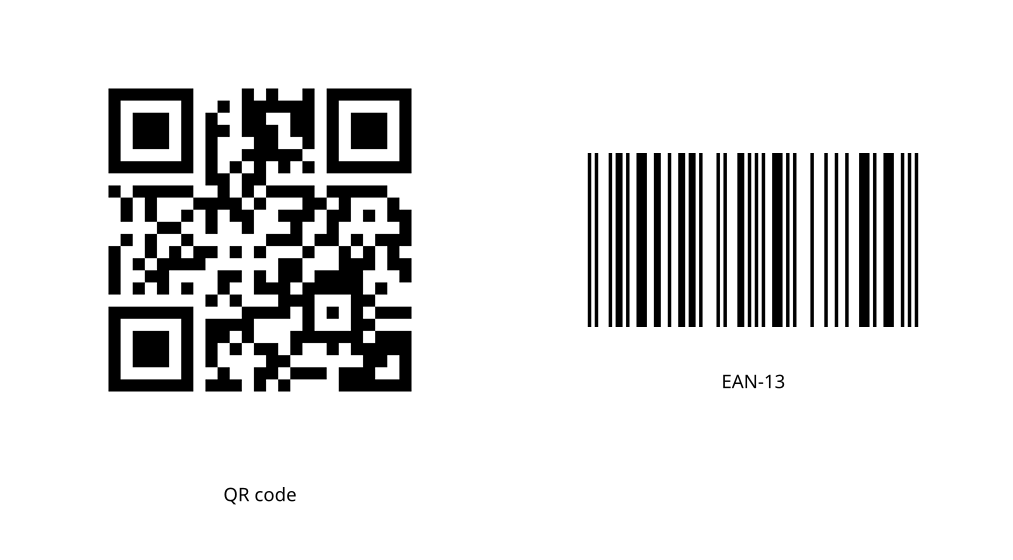
What you send here is never written to the log, and the answer is not cached.
curl
# a sample to try: https://api.dharun.dev/samples/codes.png
curl -F "[email protected]" "https://api.dharun.dev/v1/barcode/read?utm_medium=docs"
JavaScript
// input is an <input type="file"> element
const form = new FormData();
form.append("file", input.files[0]);
const response = await fetch("https://api.dharun.dev/v1/barcode/read?utm_medium=docs", { method: "POST", body: form });
const body = await response.json();
if (!response.ok) throw new Error(body.error.message);
console.log(body.data);
Python
import requests

files = [("file", open("codes.png", "rb"))]
response = requests.post("https://api.dharun.dev/v1/barcode/read?utm_medium=docs", files=files, timeout=90)
body = response.json()
if not response.ok:
    raise RuntimeError(body["error"]["message"])
print(body["data"])
Try it here
Change the values and send the request from your browser. Needs JavaScript.
Response, with lists and long text shortened
{
  "data": [
    {
      "format": "qr",
      "text": "https://api.dharun.dev",
      "points": [
        [
          151,
          349
        ],
        [
          151,
          131
        ],
        [
          369,
          131
        ]
      ]
    },
    {
      "format": "ean13",
      "text": "8901234567890",
      "points": [
        [
          593,
          270
        ],
        [
          913,
          270
        ]
      ]
    }
  ],
  "meta": {
    "total": 2,
    "note": "Points are pixel positions in the picture: the corners or finder patterns of each code."
  }
}
Guides
Using an AI assistant? Connect the MCP server and it can call this API by itself. Want every endpoint on one bench? Open the playground.