Docs / Files, documents and media
Document reading API
PDFs and scans to Markdown and tables; invoices, receipts, cheques and bank statements read and checked; Aadhaar masking and redaction.
These read documents without a language model, so they are fast and never make text up. A PDF's own text is read with the position of every word; a scan or photo is read with OCR (Tesseract). Headings come from the size of the text, tables from words that line up in columns, and an invoice's fields from their labels. Files are read and deleted; nothing is kept or logged. Needs a free API key once keys are required (see /keys).
https://api.dharun.devNo key needed for most600 units a minute, 3000 with a free keyThis page as MarkdownPDF or scan to Markdown
POST/v1/doc/markdown
Markdown with headings (from text size), lists, paragraphs and tables, page by page with a rule between pages. Text set in columns side by side is read across. Good input for a language model or a search index; method says whether the PDF's text or OCR was used. Options go in the query string, or as form fields when the file is sent as multipart/form-data.
Send: A PDF, or a picture of a page (JPEG, PNG, WebP, HEIC, AVIF, GIF, BMP or TIFF), up to 10 MB. Post the file as the request body, or as multipart/form-data. Try it with this sample.
Model endpoint: it will need a free API key, sent as Authorization: Bearer <key> or X-API-Key. Until the date on API keys it answers without one and says so in the X-Key-Notice header. With a key: 500 model requests a day.
What you send here is never written to the log, and the answer is not cached.
| Parameter | Description |
|---|---|
firstquery | PDF: first page. Default 1. |
lastquery | PDF: last page. A PDF's own text is read up to 500 pages, a scan up to 10. |
ocrquery | PDF: auto (default) reads the PDF's own text and uses OCR only when there is none; true always uses OCR; false never. One of: auto, true, false. |
langquery | OCR languages, as in /v1/ocr: up to three of eng, hin, tam, tel, kan, mal, ben, guj, pan, ori, mar joined by +. Default eng. |
curl
# a sample to try: https://api.dharun.dev/samples/invoice.pdf
curl -F "[email protected]" "https://api.dharun.dev/v1/doc/markdown?utm_medium=docs"
JavaScript
// input is an <input type="file"> element
const form = new FormData();
form.append("file", input.files[0]);
const response = await fetch("https://api.dharun.dev/v1/doc/markdown?utm_medium=docs", { method: "POST", body: form });
const body = await response.json();
if (!response.ok) throw new Error(body.error.message);
console.log(body.data);
Python
import requests

files = [("file", open("invoice.pdf", "rb"))]
response = requests.post("https://api.dharun.dev/v1/doc/markdown?utm_medium=docs", files=files, timeout=90)
body = response.json()
if not response.ok:
    raise RuntimeError(body["error"]["message"])
print(body["data"])
Try it here
Change the values and send the request from your browser. Needs JavaScript.
Response, with lists and long text shortened
{
  "data": {
    "markdown": "# Sri Murugan Stores · TAX INVOICE\n\n12 Car Street, Namakkal 637001\n\n| GSTIN 33AABCS1429B1Z1 | Invoice no. | INV-2026-0042 |\n|---|---|---|\n| State Tamil Nadu (33…",
    "pages": 1,
    "method": "text"
  },
  "meta": {
    "note": "Headings come from the size of the text, tables from words that line up in columns. Read from the PDF's own text. A scan without text is read with OCR instead; …"
  }
}
Tables in a PDF or scan
POST/v1/doc/tables
Every table found, as rows of cells with its page. A table is three or more rows whose words line up in two or more columns, with or without ruled lines. format=csv returns one table (table=N) as CSV. Options go in the query string, or as form fields when the file is sent as multipart/form-data.
Send: A PDF, or a picture of a page (JPEG, PNG, WebP, HEIC, AVIF, GIF, BMP or TIFF), up to 10 MB. Post the file as the request body, or as multipart/form-data. Try it with this sample.
Model endpoint: it will need a free API key, sent as Authorization: Bearer <key> or X-API-Key. Until the date on API keys it answers without one and says so in the X-Key-Notice header. With a key: 500 model requests a day.
What you send here is never written to the log, and the answer is not cached.
| Parameter | Description |
|---|---|
formatquery | json (default); markdown adds each table as Markdown; csv returns one table as a CSV file. One of: json, markdown, csv. |
tablequery | With format=csv: which table, from 1. Default 1. |
firstquery | PDF: first page. Default 1. |
lastquery | PDF: last page. A PDF's own text is read up to 500 pages, a scan up to 10. |
ocrquery | PDF: auto (default) reads the PDF's own text and uses OCR only when there is none; true always uses OCR; false never. One of: auto, true, false. |
langquery | OCR languages, as in /v1/ocr: up to three of eng, hin, tam, tel, kan, mal, ben, guj, pan, ori, mar joined by +. Default eng. |
curl
# a sample to try: https://api.dharun.dev/samples/invoice.pdf
curl -F "[email protected]" "https://api.dharun.dev/v1/doc/tables?utm_medium=docs"
JavaScript
// input is an <input type="file"> element
const form = new FormData();
form.append("file", input.files[0]);
const response = await fetch("https://api.dharun.dev/v1/doc/tables?utm_medium=docs", { method: "POST", body: form });
const body = await response.json();
if (!response.ok) throw new Error(body.error.message);
console.log(body.data);
Python
import requests

files = [("file", open("invoice.pdf", "rb"))]
response = requests.post("https://api.dharun.dev/v1/doc/tables?utm_medium=docs", files=files, timeout=90)
body = response.json()
if not response.ok:
    raise RuntimeError(body["error"]["message"])
print(body["data"])
Try it here
Change the values and send the request from your browser. Needs JavaScript.
Response, with lists and long text shortened
{
  "data": [
    {
      "page": 1,
      "columns": 3,
      "rows": [
        [
          "GSTIN 33AABCS1429B1Z1",
          "Invoice no.",
          "INV-2026-0042"
        ],
        [
          "State Tamil Nadu (33)",
          "Date",
          "14 Oct 2026"
        ],
        [
          "",
          "Place of supply",
          "Karnataka (29)"
        ]
      ]
    },
    {
      "page": 1,
      "columns": 10,
      "rows": [
        [
          "#",
          "ITEM",
          "HSN/SAC"
        ],
        [
          "1",
          "Basmati rice, 25 kg bag",
          "1006"
        ],
        [
          "2",
          "Steel tiffin box",
          "7323"
        ]
      ]
    },
    {
      "page": 1,
      "columns": 3,
      "rows": [
        [
          "AMOUNT IN WORDS",
          "Taxable value",
          "11,975.00"
        ],
        [
          "Thirteen thousand thirteen rupees only",
          "IGST",
          "1,037.50"
        ],
        [
          "",
          "Round off",
          "0.50"
        ]
      ]
    }
  ],
  "meta": {
    "total": 4,
    "note": "The first row of each table is usually its header. format=csv&table=N gives one table as CSV. Read from the PDF's own text. A scan without text is read with OCR…"
  }
}
Read and check a GST invoice
POST/v1/doc/invoice
Reads the invoice number and date, seller and buyer with their GSTINs and states, place of supply, HSN codes, taxable value, CGST, SGST or UTGST, IGST, cess, round off, total, amount in words, IFSC and UPI handle. Then checks them: each GSTIN's check character, the taxes adding up to the total, CGST equal to SGST, the kind of tax against the place of supply, the amount in words against the total, and the invoice number's format (Rule 46). A field not found is null. Options go in the query string, or as form fields when the file is sent as multipart/form-data.
Send: A PDF, or a picture of a page (JPEG, PNG, WebP, HEIC, AVIF, GIF, BMP or TIFF), up to 10 MB. Post the file as the request body, or as multipart/form-data. Try it with this sample.
Model endpoint: it will need a free API key, sent as Authorization: Bearer <key> or X-API-Key. Until the date on API keys it answers without one and says so in the X-Key-Notice header. With a key: 500 model requests a day.
What you send here is never written to the log, and the answer is not cached.
| Parameter | Description |
|---|---|
firstquery | PDF: first page. Default 1. |
lastquery | PDF: last page. A PDF's own text is read up to 500 pages, a scan up to 10. |
ocrquery | PDF: auto (default) reads the PDF's own text and uses OCR only when there is none; true always uses OCR; false never. One of: auto, true, false. |
langquery | OCR languages, as in /v1/ocr: up to three of eng, hin, tam, tel, kan, mal, ben, guj, pan, ori, mar joined by +. Default eng. |
curl
# a sample to try: https://api.dharun.dev/samples/invoice.pdf
curl -F "[email protected]" "https://api.dharun.dev/v1/doc/invoice?utm_medium=docs"
JavaScript
// input is an <input type="file"> element
const form = new FormData();
form.append("file", input.files[0]);
const response = await fetch("https://api.dharun.dev/v1/doc/invoice?utm_medium=docs", { method: "POST", body: form });
const body = await response.json();
if (!response.ok) throw new Error(body.error.message);
console.log(body.data);
Python
import requests

files = [("file", open("invoice.pdf", "rb"))]
response = requests.post("https://api.dharun.dev/v1/doc/invoice?utm_medium=docs", files=files, timeout=90)
body = response.json()
if not response.ok:
    raise RuntimeError(body["error"]["message"])
print(body["data"])
Try it here
Change the values and send the request from your browser. Needs JavaScript.
Response, with lists and long text shortened
{
  "data": {
    "title": "TAX INVOICE",
    "number": "INV-2026-0042",
    "date": "2026-10-14",
    "seller": {
      "name": "Sri Murugan Stores",
      "gstin": "33AABCS1429B1Z1",
      "state_code": "33",
      "state": "Tamil Nadu"
    },
    "buyer": {
      "name": "Kaveri Traders",
      "gstin": "29AAACK6812C1ZS",
      "state_code": "29",
      "state": "Karnataka"
    },
    "place_of_supply": "Karnataka (29)",
    "supply": "inter_state",
    "hsn": [
      "1006",
      "7323"
    ],
    "amounts": {
      "taxable_value": 11975,
      "cgst": null,
      "sgst": null,
      "igst": 1037.5,
      "cess": null,
      "round_off": 0.5,
      "total": 13013
    },
    "amount_in_words": "Thirteen thousand thirteen rupees only",
    "ifsc": "SBIN0000001",
    "upi": "srimurugan@okaxis",
    "checks": [
      {
        "name": "seller_gstin",
        "passed": true,
        "detail": "33AABCS1429B1Z1 is a valid GSTIN of Tamil Nadu."
      },
      {
        "name": "buyer_gstin",
        "passed": true,
        "detail": "29AAACK6812C1ZS is a valid GSTIN of Karnataka."
      },
      {
        "name": "total_adds_up",
        "passed": true,
        "detail": "Taxable value, taxes and round off add up to 13013.00; the total says 13013.00."
      }
    ],
    "method": "text",
    "all_checks_passed": true
  },
  "meta": {
    "note": "Fields are read by their labels, so an unusual layout can leave some empty (null). The checks test the invoice against itself and the GST rules; they do not ask…"
  }
}
Read a GST e-invoice's signed QR code
POST/v1/doc/einvoice-qr
Finds the signed QR code that the Invoice Registration Portal puts on an e-invoice, in a picture or the first three pages of a PDF, and returns what it holds: IRN and its date, seller and buyer GSTINs, document number, type and date, total value, item count and main HSN code, with the GSTINs and the IRN's format checked. The signature is not verified here; the e-invoice portal's "Verify signed QR code" does that. The sample is shaped like one but not signed.
Send: A PDF, or a picture of a page (JPEG, PNG, WebP, HEIC, AVIF, GIF, BMP or TIFF), up to 10 MB. Post the file as the request body, or as multipart/form-data. Try it with this sample.

Model endpoint: it will need a free API key, sent as Authorization: Bearer <key> or X-API-Key. Until the date on API keys it answers without one and says so in the X-Key-Notice header. With a key: 500 model requests a day.
What you send here is never written to the log, and the answer is not cached.
curl
# a sample to try: https://api.dharun.dev/samples/einvoice-qr.png
curl -F "[email protected]" "https://api.dharun.dev/v1/doc/einvoice-qr?utm_medium=docs"
JavaScript
// input is an <input type="file"> element
const form = new FormData();
form.append("file", input.files[0]);
const response = await fetch("https://api.dharun.dev/v1/doc/einvoice-qr?utm_medium=docs", { method: "POST", body: form });
const body = await response.json();
if (!response.ok) throw new Error(body.error.message);
console.log(body.data);
Python
import requests

files = [("file", open("einvoice-qr.png", "rb"))]
response = requests.post("https://api.dharun.dev/v1/doc/einvoice-qr?utm_medium=docs", files=files, timeout=90)
body = response.json()
if not response.ok:
    raise RuntimeError(body["error"]["message"])
print(body["data"])
Try it here
Change the values and send the request from your browser. Needs JavaScript.
Response, with lists and long text shortened
{
  "data": [
    {
      "irn": "c9dc0f70c4a4c97d98356aeeeffcf8cc3dc994364ced1875233a1d9f08bfbc8d",
      "irn_date": "2026-10-14 11:05:00",
      "seller_gstin": "33AABCS1429B1Z1",
      "buyer_gstin": "29AAACK6812C1ZS",
      "document_number": "INV-2026-0042",
      "document_type": "Tax invoice",
      "document_date": "2026-10-14",
      "total_value": 13013,
      "item_count": 2,
      "main_hsn": "1006",
      "issuer": "Sample, not issued by NIC",
      "signature": {
        "algorithm": "RS256",
        "key_id": "SAMPLE",
        "verified": false
      },
      "checks": [
        {
          "name": "seller_gstin",
          "passed": true,
          "detail": "33AABCS1429B1Z1 is a valid GSTIN."
        },
        {
          "name": "buyer_gstin",
          "passed": true,
          "detail": "29AAACK6812C1ZS is a valid GSTIN."
        },
        {
          "name": "irn_format",
          "passed": true,
          "detail": "The IRN is a SHA-256 hash: 64 hexadecimal characters. This one has 64."
        }
      ]
    }
  ],
  "meta": {
    "total": 1,
    "note": "The signature is not checked here (verified is false): the QR is signed by the Invoice Registration Portal, and the GST e-invoice portal's \"Verify signed QR cod…"
  }
}
Mask an Aadhaar number in a picture
POST/v1/doc/mask-aadhaar
Returns the picture with the first eight digits of every Aadhaar number (and the first twelve of a 16-digit Virtual ID) covered in black, leaving the last four, as the UIDAI's masked Aadhaar does, and the QR code covered too, since it holds the full number. A number is four-digit groups that pass the Verhoeff check. Answers 422 when nothing is found, so an unmasked picture is never returned as if masked. X-Masked-Numbers and X-Masked-QR-Codes say what was covered. Check the result by eye before you share it. Options go in the query string, or as form fields when the file is sent as multipart/form-data.
Send: A picture: JPEG, PNG, WebP, HEIC, AVIF, GIF, BMP or TIFF, up to 10 MB. Post the file as the request body, or as multipart/form-data. Try it with this sample.
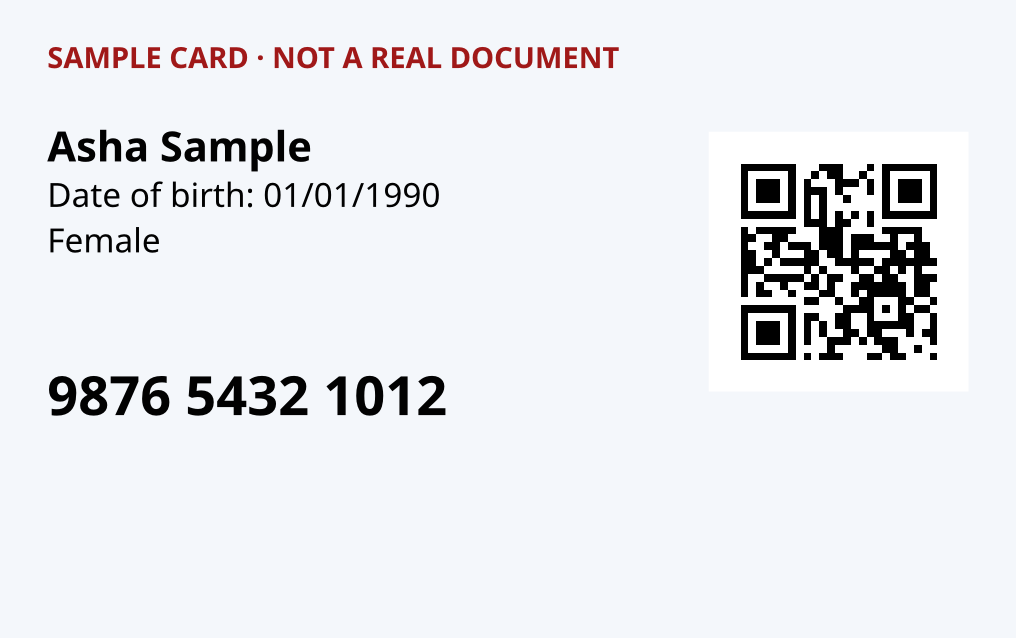
The answer returns the image itself; errors are JSON as everywhere else.
Model endpoint: it will need a free API key, sent as Authorization: Bearer <key> or X-API-Key. Until the date on API keys it answers without one and says so in the X-Key-Notice header. With a key: 500 model requests a day.
What you send here is never written to the log, and the answer is not cached.
| Parameter | Description |
|---|---|
allquery | true covers every digit. Default false (the last four stay). One of: true, false. |
qrquery | false leaves QR codes uncovered. Default true. One of: true, false. |
curl
# a sample to try: https://api.dharun.dev/samples/idcard.png
curl -F "[email protected]" -o out.png "https://api.dharun.dev/v1/doc/mask-aadhaar?utm_medium=docs"
JavaScript
// input is an <input type="file"> element
const form = new FormData();
form.append("file", input.files[0]);
const response = await fetch("https://api.dharun.dev/v1/doc/mask-aadhaar?utm_medium=docs", { method: "POST", body: form });
if (!response.ok) throw new Error((await response.json()).error.message);
const file = await response.blob();
Python
import requests

files = [("file", open("idcard.png", "rb"))]
response = requests.post("https://api.dharun.dev/v1/doc/mask-aadhaar?utm_medium=docs", files=files, timeout=90)
if not response.ok:
    raise RuntimeError(response.json()["error"]["message"])
open("out.png", "wb").write(response.content)
Try it here
Change the values and send the request from your browser. Needs JavaScript.
Read a shop receipt
POST/v1/doc/receipt
From a photo or PDF of a bill: the merchant (its first line), GSTIN, date, the lines that end in an amount, tax and total, the way it was paid when the bill says, and a check that the lines add up to the total. Options go in the query string, or as form fields when the file is sent as multipart/form-data.
Send: A PDF, or a picture of a page (JPEG, PNG, WebP, HEIC, AVIF, GIF, BMP or TIFF), up to 10 MB. Post the file as the request body, or as multipart/form-data. Try it with this sample.
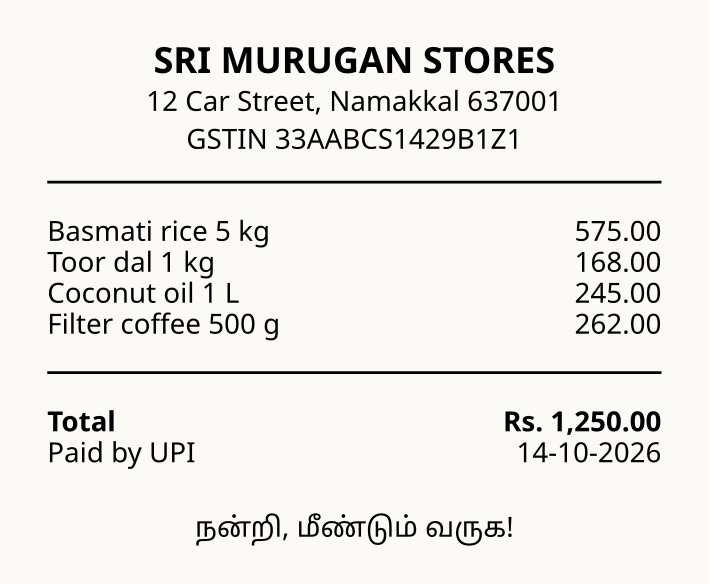
Model endpoint: it will need a free API key, sent as Authorization: Bearer <key> or X-API-Key. Until the date on API keys it answers without one and says so in the X-Key-Notice header. With a key: 500 model requests a day.
What you send here is never written to the log, and the answer is not cached.
| Parameter | Description |
|---|---|
firstquery | PDF: first page. Default 1. |
lastquery | PDF: last page. A PDF's own text is read up to 500 pages, a scan up to 10. |
ocrquery | PDF: auto (default) reads the PDF's own text and uses OCR only when there is none; true always uses OCR; false never. One of: auto, true, false. |
langquery | OCR languages, as in /v1/ocr: up to three of eng, hin, tam, tel, kan, mal, ben, guj, pan, ori, mar joined by +. Default eng. |
curl
# a sample to try: https://api.dharun.dev/samples/receipt.png
curl -F "[email protected]" "https://api.dharun.dev/v1/doc/receipt?lang=eng%2Btam&utm_medium=docs"
JavaScript
// input is an <input type="file"> element
const form = new FormData();
form.append("file", input.files[0]);
const response = await fetch("https://api.dharun.dev/v1/doc/receipt?lang=eng%2Btam&utm_medium=docs", { method: "POST", body: form });
const body = await response.json();
if (!response.ok) throw new Error(body.error.message);
console.log(body.data);
Python
import requests

files = [("file", open("receipt.png", "rb"))]
response = requests.post("https://api.dharun.dev/v1/doc/receipt?lang=eng%2Btam&utm_medium=docs", files=files, timeout=90)
body = response.json()
if not response.ok:
    raise RuntimeError(body["error"]["message"])
print(body["data"])
Try it here
Change the values and send the request from your browser. Needs JavaScript.
Response, with lists and long text shortened
{
  "data": {
    "merchant": "SRI MURUGAN STORES",
    "gstin": "33AABCS1429B1Z1",
    "date": "2026-10-14",
    "items": [
      {
        "name": "Basmati rice 5 kg",
        "amount": 575
      },
      {
        "name": "Toor dal 1 kg",
        "amount": 168
      },
      {
        "name": "Coconut oil 1 L",
        "amount": 245
      }
    ],
    "tax": null,
    "total": 1250,
    "payment": "upi",
    "checks": [
      {
        "name": "items_add_up",
        "passed": true,
        "detail": "The lines add up to 1250.00 (1250.00 with tax); the total says 1250.00."
      },
      {
        "name": "seller_gstin",
        "passed": true,
        "detail": "33AABCS1429B1Z1 is a valid GSTIN of Tamil Nadu."
      }
    ]
  },
  "meta": {
    "note": "Items are the lines above the total that end in an amount. A crumpled or faded bill reads worse: photograph it flat and straight. Read with OCR (Tesseract), so …"
  }
}
Read a cheque
POST/v1/doc/cheque
From a photo of a cheque leaf: the IFSC, the MICR line (cheque number and nine-digit MICR code), the account number when printed with a label, and the date; the IFSC and MICR code are looked up in RBI's branch list and checked against each other. Options go in the query string, or as form fields when the file is sent as multipart/form-data.
Send: A PDF, or a picture of a page (JPEG, PNG, WebP, HEIC, AVIF, GIF, BMP or TIFF), up to 10 MB. Post the file as the request body, or as multipart/form-data. Try it with this sample.
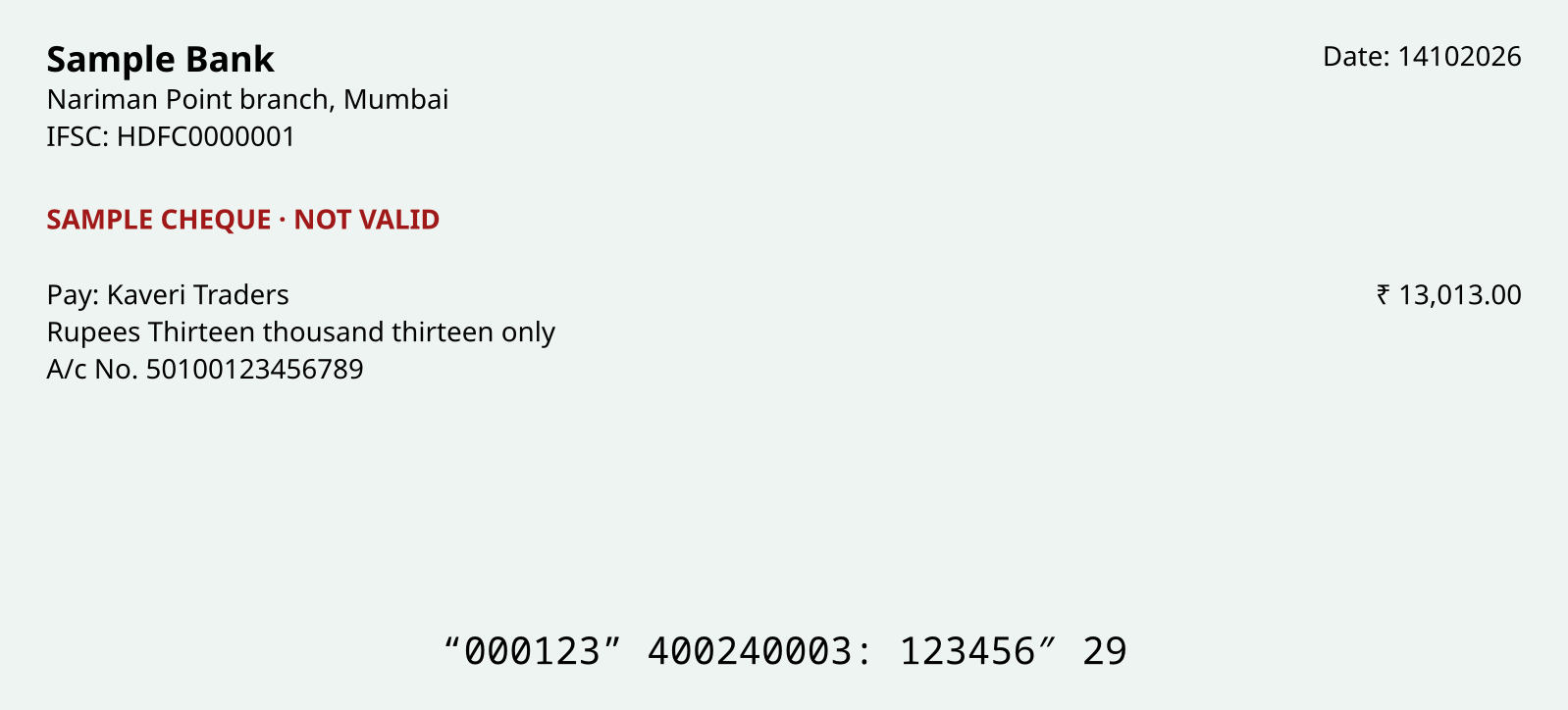
Model endpoint: it will need a free API key, sent as Authorization: Bearer <key> or X-API-Key. Until the date on API keys it answers without one and says so in the X-Key-Notice header. With a key: 500 model requests a day.
What you send here is never written to the log, and the answer is not cached.
| Parameter | Description |
|---|---|
firstquery | PDF: first page. Default 1. |
lastquery | PDF: last page. A PDF's own text is read up to 500 pages, a scan up to 10. |
ocrquery | PDF: auto (default) reads the PDF's own text and uses OCR only when there is none; true always uses OCR; false never. One of: auto, true, false. |
langquery | OCR languages, as in /v1/ocr: up to three of eng, hin, tam, tel, kan, mal, ben, guj, pan, ori, mar joined by +. Default eng. |
curl
# a sample to try: https://api.dharun.dev/samples/cheque.png
curl -F "[email protected]" "https://api.dharun.dev/v1/doc/cheque?utm_medium=docs"
JavaScript
// input is an <input type="file"> element
const form = new FormData();
form.append("file", input.files[0]);
const response = await fetch("https://api.dharun.dev/v1/doc/cheque?utm_medium=docs", { method: "POST", body: form });
const body = await response.json();
if (!response.ok) throw new Error(body.error.message);
console.log(body.data);
Python
import requests

files = [("file", open("cheque.png", "rb"))]
response = requests.post("https://api.dharun.dev/v1/doc/cheque?utm_medium=docs", files=files, timeout=90)
body = response.json()
if not response.ok:
    raise RuntimeError(body["error"]["message"])
print(body["data"])
Try it here
Change the values and send the request from your browser. Needs JavaScript.
Response, with lists and long text shortened
{
  "data": {
    "ifsc": "HDFC0000001",
    "micr": "400240003",
    "cheque_number": "000123",
    "account_number": "50100123456789",
    "date": "2026-10-14",
    "branch": {
      "address": "101-104 TULSIANI CHAMBERSFREE PRESS JOURNAL MARGNARIMAN POINTMUMBAI MAHARASHTRA 400 021",
      "bank": {
        "code": "HDFC",
        "name": "HDFC Bank"
      },
      "branch": "TULSIANI CHMBRS - NARIMAN PT",
      "centre": "Mumbai",
      "city": "Greater Mumbai",
      "contact": "+919890603333",
      "district": "Mumbai",
      "ifsc": "HDFC0000001",
      "imps": true,
      "micr": "400240003",
      "neft": true,
      "rtgs": true,
      "state": "Maharashtra",
      "stateCode": "MH",
      "swift": "HDFCINBB",
      "upi": true
    },
    "micr_branch": null,
    "checks": [
      {
        "name": "ifsc_known",
        "passed": true,
        "detail": "The IFSC HDFC0000001 is a branch in RBI's list."
      }
    ]
  },
  "meta": {
    "note": "The MICR line is printed in a magnetic font that ordinary OCR reads imperfectly; the MICR code is checked against RBI's branch list. This reads a cheque; it doe…"
  }
}
Bank statement to transactions
POST/v1/doc/statement
Every transaction of a bank statement: date, description (lines that run on are joined), reference, debit, credit and balance, with each balance checked against the one before. Columns are found by the header row, so most banks' text PDFs work; a scan is read with OCR. format=csv returns a CSV file. Options go in the query string, or as form fields when the file is sent as multipart/form-data.
Send: A PDF, or a picture of a page (JPEG, PNG, WebP, HEIC, AVIF, GIF, BMP or TIFF), up to 10 MB. Post the file as the request body, or as multipart/form-data. Try it with this sample.
Model endpoint: it will need a free API key, sent as Authorization: Bearer <key> or X-API-Key. Until the date on API keys it answers without one and says so in the X-Key-Notice header. With a key: 500 model requests a day.
What you send here is never written to the log, and the answer is not cached.
| Parameter | Description |
|---|---|
formatquery | json (default) or csv. One of: json, csv. |
firstquery | PDF: first page. Default 1. |
lastquery | PDF: last page. A PDF's own text is read up to 500 pages, a scan up to 10. |
ocrquery | PDF: auto (default) reads the PDF's own text and uses OCR only when there is none; true always uses OCR; false never. One of: auto, true, false. |
langquery | OCR languages, as in /v1/ocr: up to three of eng, hin, tam, tel, kan, mal, ben, guj, pan, ori, mar joined by +. Default eng. |
curl
# a sample to try: https://api.dharun.dev/samples/statement.pdf
curl -F "[email protected]" "https://api.dharun.dev/v1/doc/statement?utm_medium=docs"
JavaScript
// input is an <input type="file"> element
const form = new FormData();
form.append("file", input.files[0]);
const response = await fetch("https://api.dharun.dev/v1/doc/statement?utm_medium=docs", { method: "POST", body: form });
const body = await response.json();
if (!response.ok) throw new Error(body.error.message);
console.log(body.data);
Python
import requests

files = [("file", open("statement.pdf", "rb"))]
response = requests.post("https://api.dharun.dev/v1/doc/statement?utm_medium=docs", files=files, timeout=90)
body = response.json()
if not response.ok:
    raise RuntimeError(body["error"]["message"])
print(body["data"])
Try it here
Change the values and send the request from your browser. Needs JavaScript.
Response, with lists and long text shortened
{
  "data": [
    {
      "date": "2026-10-01",
      "description": "Opening balance",
      "debit": null,
      "credit": null,
      "balance": 25000,
      "balance_ok": null
    },
    {
      "date": "2026-10-02",
      "description": "UPI-SRI MURUGAN STORES- srimurugan@okaxis",
      "reference": "627512345678",
      "debit": 1250,
      "credit": null,
      "balance": 23750,
      "balance_ok": true
    },
    {
      "date": "2026-10-05",
      "description": "NEFT CR-KAVERI TRADERS- SALARY OCT 2026",
      "reference": "N278261234567",
      "debit": null,
      "credit": 45000,
      "balance": 68750,
      "balance_ok": true
    }
  ],
  "meta": {
    "total": 7,
    "note": "Columns are found by the header row (date, narration, reference, withdrawals or debits, deposits or credits, balance). balance_ok checks each balance against th…"
  }
}
Redact a PDF or picture
POST/v1/doc/redact
Finds the identifiers that /v1/text/redact finds (Aadhaar, PAN, GSTIN, phone numbers, email addresses, card and account numbers, UPI handles and more) in a PDF or picture and returns it with each covered in black. A PDF comes back as pictures of its pages, so no text survives under a box. X-Redacted counts what was covered by type; 422 when nothing was found. Names are not found; check the result before you share it. Options go in the query string, or as form fields when the file is sent as multipart/form-data.
Send: A PDF, or a picture of a page (JPEG, PNG, WebP, HEIC, AVIF, GIF, BMP or TIFF), up to 10 MB. Post the file as the request body, or as multipart/form-data. Try it with this sample.
The answer returns the PDF itself; errors are JSON as everywhere else.
Model endpoint: it will need a free API key, sent as Authorization: Bearer <key> or X-API-Key. Until the date on API keys it answers without one and says so in the X-Key-Notice header. With a key: 500 model requests a day.
What you send here is never written to the log, and the answer is not cached.
| Parameter | Description |
|---|---|
typesquery | Which kinds to cover, comma-separated, as in /v1/text/redact. Default all. |
firstquery | PDF: first page. Default 1. |
lastquery | PDF: last page. A PDF's own text is read up to 500 pages, a scan up to 10. |
ocrquery | PDF: auto (default) reads the PDF's own text and uses OCR only when there is none; true always uses OCR; false never. One of: auto, true, false. |
langquery | OCR languages, as in /v1/ocr: up to three of eng, hin, tam, tel, kan, mal, ben, guj, pan, ori, mar joined by +. Default eng. |
curl
# a sample to try: https://api.dharun.dev/samples/statement.pdf
curl -F "[email protected]" -o out.pdf "https://api.dharun.dev/v1/doc/redact?utm_medium=docs"
JavaScript
// input is an <input type="file"> element
const form = new FormData();
form.append("file", input.files[0]);
const response = await fetch("https://api.dharun.dev/v1/doc/redact?utm_medium=docs", { method: "POST", body: form });
if (!response.ok) throw new Error((await response.json()).error.message);
const file = await response.blob();
Python
import requests

files = [("file", open("statement.pdf", "rb"))]
response = requests.post("https://api.dharun.dev/v1/doc/redact?utm_medium=docs", files=files, timeout=90)
if not response.ok:
    raise RuntimeError(response.json()["error"]["message"])
open("out.pdf", "wb").write(response.content)
Try it here
Change the values and send the request from your browser. Needs JavaScript.
Using an AI assistant? Connect the MCP server and it can call this API by itself. Want every endpoint on one bench? Open the playground.